


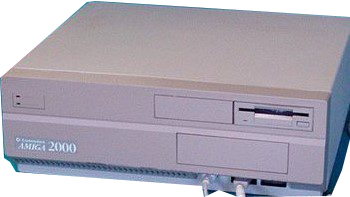
Commodore AMIGA 2000 | TechMuseum
Year of manufacture: 1987-1990
Technical Specifications:
- Processor: Motorola MC68000 , 7.16 MHz
- RAM: 512 KB or 1MB
- FDD: One disk 3.5″
- HDD: One disk (on the 2000HD model)
- Audio: Four voice, 8 bit
- Connectors/Ports: Processor card slot, external floppy disk, mouse, keyboard, two stereo, parallel, serial, video, five expansion slots, RGB, two ISA slots
- Case: Desktop type
- Monitor: Color
- OS: AMIGA OS 1.3
The Commodore Amiga 2000 features a Motorola MC68000 processor at 7.16 MHz and memory of 512 up to 1MB. Equipped with a floppy disk of 3.5” and an HDD it runs with the operating system of AmigaOS version 1.3.
Commodore introduced the AMIGA family computers in mid-1980s, 1985. The original models run with 16-bit or 32-bit processors and memory RAM of 256kB or more. The Amiga series brought a substantial improvement on performance and graphics compared with the Atari ST or Macintosh counterparts. Of course the hardware improved progressively through the new releases.
The best-selling model of the series was the Amiga 500, but others such as the Commodore Amiga 2000, 600, 1000 or 4000 sold millions of units as well. Becoming widely available, the models were advertised as versatile, all-purpose machines for business use.
The end of the series came with the announcement of the company going bankrupt in April 1994, but followed many successors to the Amiga line, such as Genesi, Eyetech. The Amiga Operating system has influenced others, like MorphOS and AROS.
That was just a snapshot on the presentation of the techmuseum series. Indulge more into the history. Continue reading more about the present model, the Commodore Amiga 2000 here.
PC.GR
The history of personal computers
Explore this exhibit with the video guide, which opens the PC.gr presentation in a video window.