

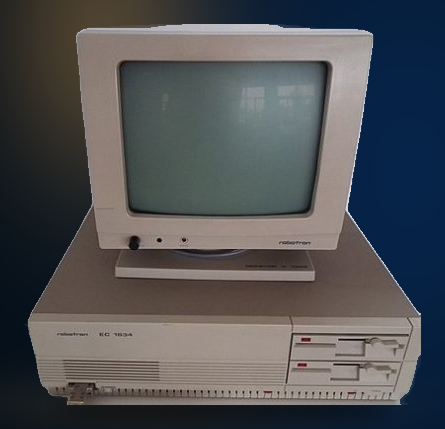
Robotron EC 1834 | TechMuseum
Year of manufacture: 1982-1986
Technical Specifications:
- Processor: Siemens 8086 , 4.91 MHz
- RAM: 640 KB
- FDD: Two Floppy disk 5.25″ (720 KB)
- HDD: 40 MB
- Audio: Speaker
- Connectors/Ports: Printer, serial, keyboard, video, parallel, monitor
- Case: Desktop type
- Monitor: Monochrome
- OS: DCP 3.3 or DOS or Windows 3.0
The Robotron EC 1834 features a Siemens 8086 processor at 4.91 MHz and memory of 640kB. Equipped with two floppy disks of 5.25” at 720kB and an HDD at 40MB it ran with the operating system of the DCP 3.3 or DOS or Windows 3.0 versions
VEB Robotron, the grandest East German electronics company at that time, was involved in many different divisions. Those included personal computers, mainframe and microcomputers as well. The company also manufactured radios, televisions, typewriters, printers and many more.
In the personal computer division, the company was notably successful in designing, producing and marketing different computer series, like the KC (Kleincomputer), Axxx and PC one alike. Many computer systems featured 8-bit microprocessor, but some presented 16-bit ones.
Product sales of Robotron didn’t limit in the borders of divided Germany. In West Germany the corporation sold as Soemtron or Prasident, providing printer parts for Commodore as well. In East Germany, particularly in the printer division, under the Robotron brand sold Epson.
That was just a snapshot on the presentation of the techmuseum series. Indulge more into the history. Continue reading more about the present model, the Robotron EC 1834 here.
PC.GR
The history of personal computers
Explore this exhibit with the video guide, which opens the PC.gr presentation in a video window.