
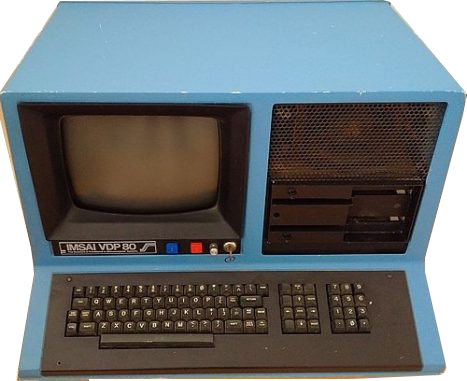
IMSAI VPD 80
Year of manufacture: 1977
Technical Specifications:
- Processor: Intel 8085, 3 MHz
- RAM: 32 or 64 KB
- FDD: –
- HDD: –
- Audio:-
- Connectors/Ports: Serial , parallel
- Case: Desktop type
- Monitor: Monochrome
- OS: CP/M
The IMSAI VPD 80 uses an Intel 8085 processor at 3 MHz. The manufacturer brochure lists configurations with 32 or 64 KB of RAM and two 8-inch floppy drives. It was supplied with IMDOS, which is compatible with CP/M.
The IMSAI 8080 was one of the earliest successes in the personal computing industry. Deisgned, produced and marketed by the IMS Associates Inc. (standing for Information Management Sciences) entered the market in 1975. The firm’s main enterprise division was computer consultancy and engineering for mainframe users.
The company contacted back in 1974 a client wanting a workstation system that could complete jobs for any General Motors new car dealership. As a consulting agency, IMS planned the system and 5 stations would have common access to one hard disk from a computer. Instead they turned to the manufacture of microprocessors. The following year, the company shipped hundreds of thousands units. This was enough for them to make a transition, from a consulting company to a manufacturing firm, changing the name to IMSAI Manufacturing Corporation.
Continue reading more about the present model, the IMSAI VPD 80 here.
PC.GR
The history of personal computers
Explore this digital exhibit with the video guide, which opens the PC.gr presentation in a video window. Source series: TechMuseum.