
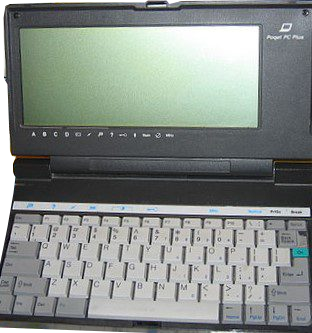
Fujitsu Poqet PC Plus
Year of manufacture: 1987
Technical Specifications:
- Processor: NEC V30, 16 MHz
- RAM: 2 MB
- FDD: –
- HDD: –
- Audio: Piezo or speaker
- Connectors/Ports: Two serial, two expansion slots for card
- Case: Portable type
- Monitor: Monochrome
- OS: MS DOS 5.0
The Fujitsu Poqet PC Plus features a NEC V30 processor at 16 MHz and memory of 2MB. It ran with the operating system of the MS DOS 5.0 version.
Poqet Computer Corporation introduced to consumers the first light and reliable subnotebook that was IBM compatible. Powered by 2 AA batteries, the notebook could last from two weeks to two months according to usage. Even with rough power management, the computer would have no problem. Another strong selling point for the device was the “Instant ON” feature. After shutting down, if immediately turned on again the user could circumvent the booting up procedure.
The Poqet Corporation released three variants, PC, Classic and Prime. Two improved features of the models were the RAM expansion and the better power management. The Poqet PC in particular was recognized as a milestone for portable computing. The production period though was short, despite being called one of the 50 greatest gadgets of the last 50 years. When Fujitsu completed the acquisition of Poqet, it discontinued the product line of pocket notebooks.
Continue reading more about the present model, the Poqet PC Plus here.
PC.GR
The history of personal computers
Explore this digital exhibit with the video guide, which opens the PC.gr presentation in a video window. Source series: TechMuseum.