
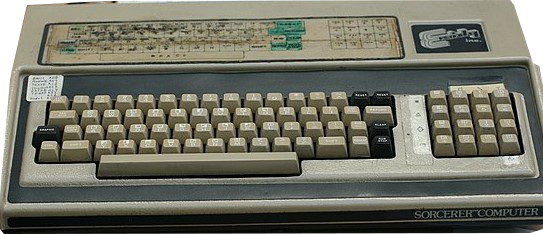
Exidy Sorcerer
Year of manufacture: 1978-1982
Technical Specifications:
- Processor: Zilog Z80A, 2.1 MHz
- RAM: 8 KB
- FDD: Floppy disk
- HDD: –
- Audio: Speaker
- Connectors/Ports: Serial, parallel, cassette tape, video, expansion bus
- Case: Keyboard type
- Monitor: Monochrome
- OS: CP/M
The Exidy Sorcerer features a Zilog Z80A processor at 2.1 MHz and memory of 8kB. Equipped with a floppy disk it ran with the operating system of the CP/M version.
The Sorcerer home computer system, based on the Zilog Z80 and emerging S-100 standard, present grand competition to the Commodore PET and TRS-80 contemporary counterparts. The position attained in the sales market was primarily through international distributors due to the lack of support from the parent company. Strong distribution agreements were signed with Australian Dick Smith Electronics and UK’s Compudata.
Creator Paul Terrell became involved with computer engineering through Byte Shop, the first personal computer store. After meeting substantial success, he then sold the chain and as a freelance designed a computer with highly competitive features at an affordable price. Wanting to bring magic to the computer world, he introduced the Sorcerer to consumers.
Continue reading more about the present model, the Exidy Sorcerer here.
PC.GR
The history of personal computers
Explore this digital exhibit with the video guide, which opens the PC.gr presentation in a video window. Source series: TechMuseum.