
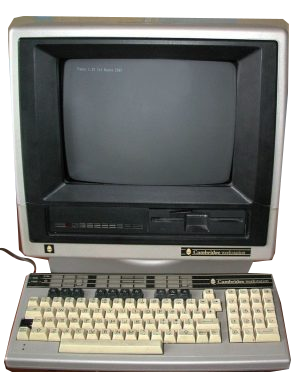
Acorn Cambridge Workstation 210
Year of manufacture: 1984-1985
Technical Specifications:
- Processor: NMS32016 , 4 or 6 or 8 or 10 MHz
- RAM: 32 KB
- FDD: Floppy disk 5.25″
- HDD: 20 MB
- Audio: Seven octaves, three channels, noise channel
- Connectors/Ports: RGB, serial, user, bus, analog, disk, mouse, econet
- Case: Keyboard type
- Monitor: Color
- OS: BBC MOS or PANOS
The Acorn Cambridge Workstation 210 features a NMS32016 processor at up to 10 MHz and memory of 32kB. Equipped with a floppy disk of 5.25” and an HDD at 20MB it ran with the operating system of the BBC MOS or PANOS version.
Acorn Computers was a British electronics company, founded in 1978. During the 1980s, the company dominated the computer market, especially in the education sector. The corporation had various subsidiaries with different division operations. For example, Arm Inc. is dominant in the mobile phone, PDA and microprocessor market.
Acorn has been referred as the “British Apple” as well. It is a catalyst for technological innovations, maintaining pressure to other competitors, such as Fairchild Semiconductor and BBC.
Continue reading more about the present model, the Acorn Cambridge Workstation 210 here.
PC.GR
The history of personal computers
Explore this digital exhibit with the video guide, which opens the PC.gr presentation in a video window. Source series: TechMuseum.